HN Debrief

Git rebase -i is not that scary

  • Programming
  • Developer Tools
  • Open Source

The post walks through `git rebase -i` as a way to reorder, squash, reword, or drop commits before sharing a branch. It frames interactive rebase as a normal cleanup tool for local history, not a risky last-resort operation. People mostly agreed with that, but the valuable point was sharper than the post’s headline: rebase stops feeling scary once you understand Git’s recovery model. Committed work is usually recoverable. Uncommitted work is what you actually lose. That pushed `git reflog`, `ORIG_HEAD`, and cheap backup refs like throwaway branches or tags to the center of the conversation, not as edge-case tricks but as the prerequisite mental model for using history rewriting confidently.

If your team wants cleaner reviewable commits, teach reflog, ORIG_HEAD, fixup/autosquash, rerere, and diff checks before teaching rebasing itself. If your workflow rarely depends on curated history, don’t force heavy rebase culture where squash merges or first-parent history already solve the real problem.

Discussion mood

Mostly positive on interactive rebase itself, but split on the culture around it. People were enthusiastic about the power once you know the escape hatches, and much less enthusiastic about elitist takes or teams that fetishize immaculate history without a clear payoff.

Key insights

  1. 01

    Recovery tools make rebase safe

    Confidence with history rewriting comes from knowing Git keeps a trail of where HEAD pointed and gives you fast ways back. `git reflog` is the general recovery tool, `ORIG_HEAD` often undoes a rebase in one shot, and a throwaway branch or tag before starting turns the whole exercise into a reversible edit instead of a leap of faith. That reframes rebase from dangerous to routine for committed work.

    Train people on recovery before cleanup. A short internal guide that starts with reflog, `reset ORIG_HEAD`, and backup refs will remove more fear than another rebase tutorial.

      Attribution:
    • mikemcquaid #1
    • hetman #1
    • xelxebar #1
    • flyingcircus3 #1
    • KoleSeise1277 #1
  2. 02

    Most rebase pain is conflict handling

    The hard part is not moving commits around. It is understanding and re-solving conflicts during replay. `zdiff3` adds the parent context you need to see what a commit was trying to change, resolving each stop for that commit keeps the replay coherent, and `rerere` pays off the second time you hit the same conflict. People who rebase often described this as the difference between cryptic busywork and a manageable process.

    If rebases in your team keep stalling, change config and habits before changing policy. Turn on `merge.conflictStyle=zdiff3` and `rerere`, then teach conflict resolution as a per-commit task.

      Attribution:
    • xg15 #1
    • OJFord #1
    • seba_dos1 #1
    • LunicLynx #1
    • formerly_proven #1
    • aneidon #1
  3. 03

    Fixup and patch tools beat manual surgery

    A lot of cleanup work does not need hand-editing the interactive todo file. `git commit --fixup` or `--squash` plus `git rebase --autosquash` handles the common case cleanly, `edit` is the escape hatch for splitting old commits, and `git add -p` is how people carve a messy working tree into logical pieces before or during that process. Several comments also pushed back on teaching only short flags, because the concepts are already hard enough without turning commands into memorized spells.

    Standardize a small set of higher-level patterns instead of expecting everyone to improvise during rebase. `fixup`, `autosquash`, `add -p`, and `edit` cover most real cleanup work.

      Attribution:
    • pajko #1
    • gsliepen #1
    • trescenzi #1
    • pmontra #1
    • collabs #1
  4. 04

    Logical commits are mainly a review tool

    The strongest pro-rebase case was not aesthetics. It was review throughput. Teams that review commit-by-commit, use stacked patch sets, or compare patch revisions get a real benefit from rebasing into small logical units. In that setup, history cleanup is part of making code review cheaper and preserving intent across revisions, not just making `git log` look pretty.

    Use interactive rebase where your review process consumes commit structure. If reviewers only ever look at the final squashed diff, the returns on meticulous local history are much lower.

      Attribution:
    • avaer #1
    • OneDeuxTriSeiGo #1
    • zith #1
    • beebix #1
    • collabs #1
  5. 05

    Better interfaces lower the barrier

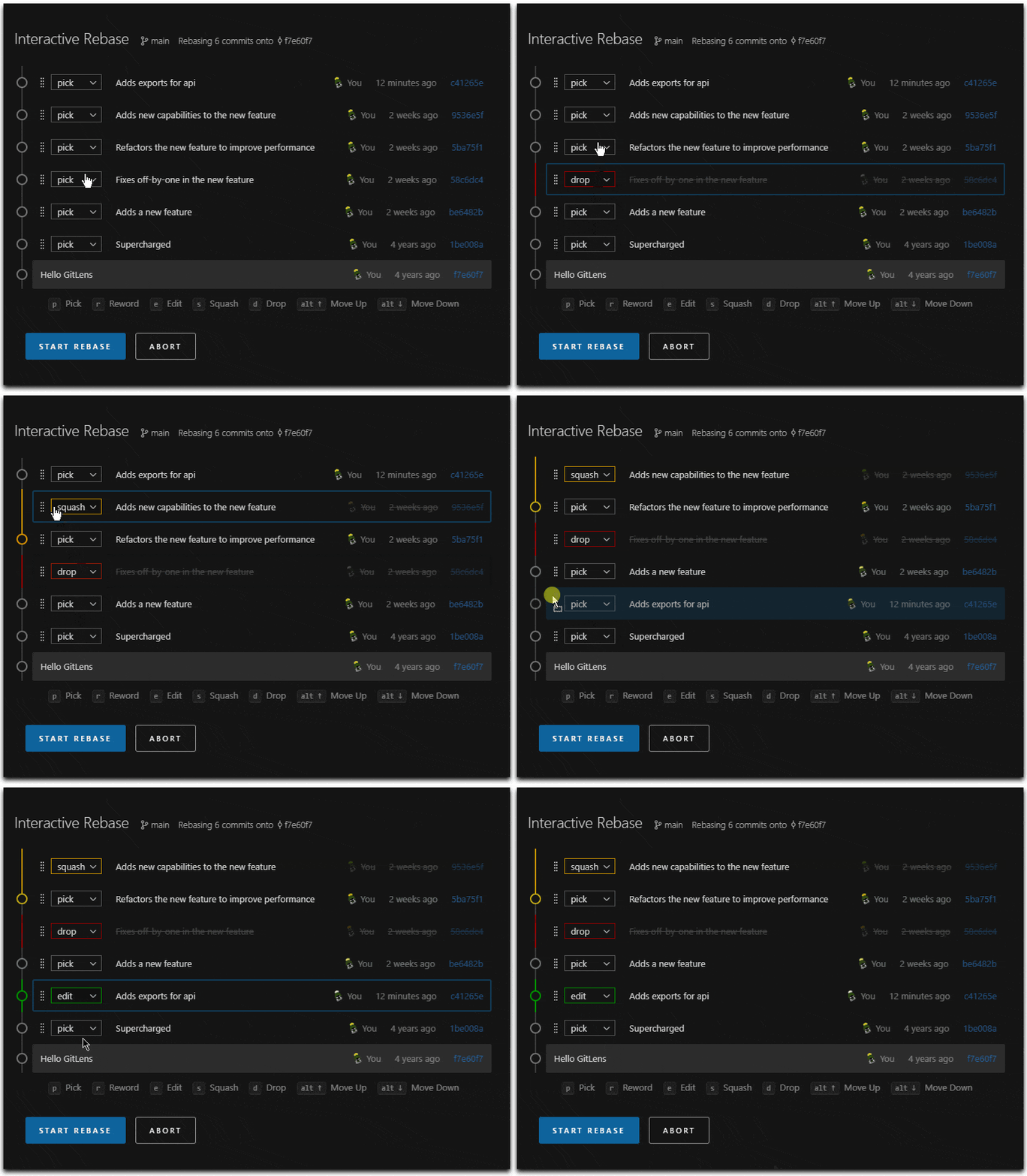
    A lot of fear around interactive rebase is plain interface friction. Editing a todo list in `vi` scares people more than the underlying operation. GitLens gives a drag-and-drop rebase UI, Magit and Emacs make commit surgery feel precise, and terminal helpers like `git-interactive-rebase-tool`, `lazygit`, and `git-absorb` smooth out the same workflow. That suggests some teams have a tooling problem more than a Git concepts problem.

    Do not force every developer through the raw text editor path if the goal is better history. Offer a supported GUI or TUI workflow and keep the conceptual training separate from the editor training.

      Attribution:
    • maxloh #1
    • QGQBGdeZREunxLe #1
    • cmrdporcupine #1
    • skydhash #1
    • t-writescode #1
  6. 06

    Old branches need incremental catch-up

    For long-lived branches, the usual pain is not one hard conflict but a giant pile of them after months of drift. One commenter described using bisect to find the first conflicting upstream commit and rebasing in stages. Another pointed to `git imerge` as a tool built around that idea. The useful framing is that branch age changes the right strategy. One-shot rebases stop scaling well as divergence grows.

    If a branch is weeks or months behind, stop treating rebase as a single event. Catch up incrementally or try tools like `git imerge` before conflict debt becomes a full rewrite.

      Attribution:
    • conradludgate #1
    • auscompgeek #1

Against the grain

  1. 01

    Clean history is often oversold

    A curated commit graph is not automatically worth the effort. If your mainline is already readable through squash merges or `--first-parent`, obsessing over perfectly shaped local history can become process theater. The counterargument from maintainers who debug old code is real, but it depends on whether your team actually uses commit granularity to understand failures or just likes the idea of it.

    Audit how often your team truly relies on commit-level archaeology. If the answer is rarely, bias toward simpler merge policies and preserve rigor in code review and release notes instead.

      Attribution:
    • fisensee #1
    • mikeocool #1
    • xorcist #1
    • geon #1
    • boesboes #1
  2. 02

    Rebase skill is not a hiring filter

    Some comments treated fear of `git rebase -i` as evidence of weak engineering. That drew pushback because the gap is often workflow exposure or UI friction, not inability. Plenty of capable developers work in teams and tools where they almost never touch interactive rebase directly. Treating that as a purity test confuses tool familiarity with judgment.

    Interview for reasoning about version control tradeoffs, recovery, and collaboration, not for comfort with one command-line ritual. You can teach interactive rebase far faster than you can teach code review discipline.

      Attribution:
    • harpiaharpyja #1
    • avaer #1
    • dtheodor #1
    • chrysoprace #1
    • fleventynine #1
  3. 03

    Repeated rebases can waste real time

    Even people who like rebasing pointed out the ugly case where a branch needs multiple rounds of conflict resolution before review is done. Without `rerere` or a stacked workflow that keeps ancestry obvious, you can end up paying the same merge tax again and again. In that environment, rebasing is not scary so much as expensive.

    Measure the churn in your review cycle. If developers keep re-solving the same conflicts, enable `rerere`, shorten branch lifetime, or switch to a merge strategy that stops replaying the same pain.

      Attribution:
    • occz #1
    • dathinab #1
    • zith #1
    • dsauerbrun #1
    • aneidon #1
    • eviks #1

In plain english

autosquash
A Git rebase feature that automatically moves and marks fixup or squash commits to be combined with their targets.
Emacs
A programmable text editor often used heavily from the keyboard.
first-parent
A Git history view that follows only the mainline parent of merge commits, which simplifies how merged history appears.
fixup
A Git commit intended to be automatically folded into an earlier commit during a later rebase.
Git
A distributed version control system used to track changes in source code and coordinate work across developers.
git add -p
A Git command that lets you stage only selected parts of a file change instead of the whole file.
git bisect
A Git command that performs a binary search through commit history to find which commit introduced a bug.
git imerge
A Git extension for performing merges or rebases incrementally to spread out conflict resolution.
git range-diff
A Git command that compares two versions of a commit series to show how the patches changed.
git-absorb
A Git helper that automatically creates fixup commits based on uncommitted changes and blame information.
GitLens
A Visual Studio Code extension that adds richer Git history, blame, and rebase tools to the editor.
HEAD
The Git reference that points to your current checked-out commit or branch tip.
interactive rebase
A Git operation that replays commits one by one and lets you edit, reorder, combine, rename, or remove them.
lazygit
A terminal-based Git user interface for common version control tasks.
Magit
A powerful Git interface for Emacs.
merge.conflictStyle=zdiff3
A Git setting that shows both sides of a conflict plus their common ancestor, giving more context while resolving merges or rebases.
ORIG_HEAD
A special Git reference that often stores the commit you were on before a risky operation like rebase or reset.
rebase
A Git command that moves a series of commits onto a new base commit by replaying them.
reflog
Git’s local record of where branch tips and HEAD pointed over time, which helps you recover previous states.
rerere
Short for reuse recorded resolution, a Git feature that remembers how you resolved a conflict and can apply that resolution again later.
reword
An interactive rebase action that changes a commit message without changing the code in that commit.
squash
The act of combining multiple commits into a single commit.

Reference links

Git recovery and documentation

  • gitrevisions(7) manual page
    Referenced for Git revision syntax and special refs like ORIG_HEAD during recovery and targeted rebases.
  • Git aliases documentation
    Shared as the simplest way to create a shorthand for repetitive amend commands.
  • gittutorial
    Suggested as official introductory material for learning Git from the source project.
  • giteveryday
    Suggested as a practical official guide to everyday Git workflows.
  • gitworkflows
    Suggested as official documentation on common Git workflow patterns.
  • gitfaq
    Suggested as an official FAQ for recurring Git questions.
  • Git cheat sheet
    Suggested as a compact reference for common Git commands.
  • Pro Git book
    Suggested for readers who want a deeper understanding of Git internals and workflows.
  • git history fixup documentation
    Referenced as a newer command that streamlines creating fixup commits.

Alternative tools and interfaces

Security and repository retention